
Hive OS has become one of the most powerful and reliable mining management platforms on the market, used by individual miners and large farms alike to control and monitor cryptocurrency rigs. Designed for both GPUs and ASICs, this system offers features that make your mining operation more efficient, scalable, and easier to manage.
In this guide, you’ll learn how to install Hive OS, configure it for your hardware, understand its core benefits, and optimize your setup for long-term mining success.
🧠 What Is Hive OS?
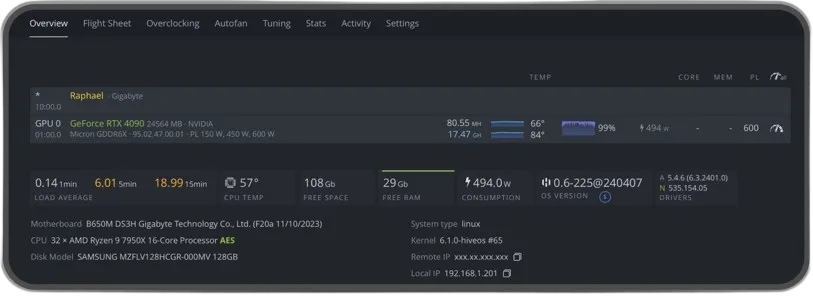
Hive OS is a Linux-based operating system built specifically for mining cryptocurrencies. It provides a centralized dashboard to:
- manage multiple mining rigs
- monitor performance in real time
- adjust configurations remotely
- tweak overclock and power settings
It supports both GPU rigs and ASIC miners and is designed to be scalable from a single rig to a large mining farm.
🛠️ How to Install Hive OS
Here’s a straightforward installation process:
- Download the Hive OS image from the official site — choose the version that suits your hardware (GPU or ASIC).
- Create a boot disk using a tool like balenaEtcher or Rufus (8 GB+ drive recommended).
- Configure your Hive OS account with your worker IDs and rig parameters.
- Boot your rig with the Hive OS USB/SSD and let it connect to your Hive dashboard.
🔍 Key Benefits of Using Hive OS
🌐 Centralized Efficiency
Hive OS allows you to manage all your rigs from one dashboard, significantly reducing manual effort and time spent on individual machines.
🛠️ Remote Control and Monitoring
From anywhere, you can monitor:
- hashrates
- temperatures
- power usage
- fan speeds
All directly from the web or the mobile app dashboard.
⚡ Support for Multiple Devices
The platform supports a wide range of mining hardware — from AMD and NVIDIA GPU rigs to major ASIC miners.
🔧 Customization and Optimization
Hive OS offers sophisticated features like:
- automated updates
- overclocking profiles
- custom miner configurations
- flight sheets for quick pool/wallet changes
⚙️ How to Optimize Hive OS for Mining
💪 Overclocking and Tuning
Use Hive OS’s built-in overclocking profiles to improve performance and power efficiency. You can apply pre-defined overclock templates or create your own for each rig.
- Adjust core and memory clock speeds
- Lower power limits to reduce energy draw
- Use fan curves to manage heat effectively
🛡️ Security & Stability
Enable remote watchdog tools and automatic reboot strategies to ensure rigs recover from drops in hashrate or system errors without manual intervention.
❓ Frequently Asked Questions
Is Hive OS free?
Yes — Hive OS is free to use up to a limited number of rigs; beyond that, a small subscription may apply.
Can I mine multiple coins at once?
Yes — Hive OS supports multiple mining algorithms and can run different coins simultaneously when configured correctly.
What hardware do I need?
Hive OS works with rigs that have at least 4 GB of RAM and 8 GB of storage for installation.
🏁 Conclusion
Hive OS is a complete solution for anyone interested in cryptocurrency mining — from beginners to professional operators. It stands out not just for its powerful features but also for the way it centralizes management, simplifies configuration, and helps optimize performance across your entire mining operation.
Looking for more Linux system administration tips and fixes?
Browse all Linux & System Administration guides →